The vast majority of LLM API tutorials show the simplest possible usage: send a prompt, await a response, print the result. In a demo that works fine. In a product that ships to users — where a query might take 20 seconds to complete — it is a bad experience you can measure in bounce rates.
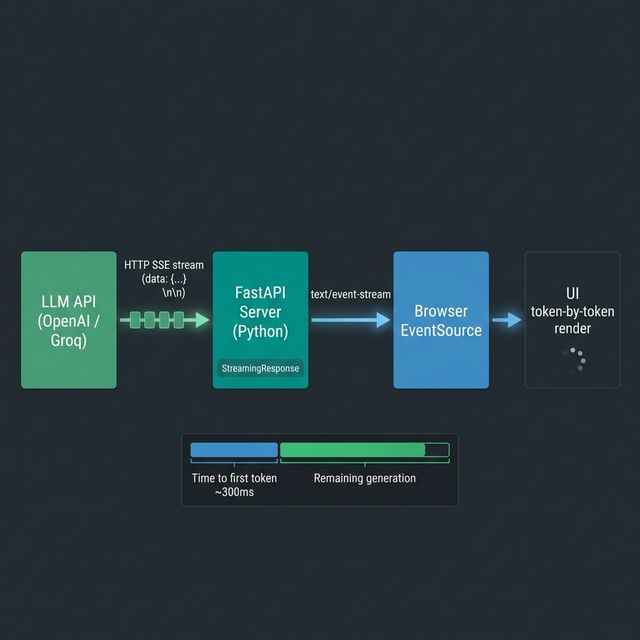
Streaming APIs solve this. The model sends each token as it generates it, and your application forwards it to the client immediately. The user sees text appearing word by word, perceiving the system as fast even if total generation time is unchanged. This is how every serious consumer AI product works — and it requires a slightly different programming model than the blocking request/response cycle.
How Streaming Works at the Protocol Level
LLM streaming uses Server-Sent Events (SSE), a lightweight HTTP protocol for server-to-client one-way streaming. The response is a stream of text lines, each prefixed data: , terminated with a blank line:
data: {"id":"chatcmpl-abc","choices":[{"delta":{"content":"The"},"finish_reason":null}]}

data: {"id":"chatcmpl-abc","choices":[{"delta":{"content":" weather"},"finish_reason":null}]}

data: {"id":"chatcmpl-abc","choices":[{"delta":{"content":" today"},"finish_reason":null}]}

data: [DONE]
Your client reads this line by line, strips data: , parses the JSON, and extracts the delta.content field. The [DONE] sentinel signals the end of the stream.
Understanding the raw protocol matters because it explains why naive requests usage doesn’t work for streaming — you need to use stream=True and iterate over response lines, or use a library that handles SSE natively.
The Minimal Streaming Client
Using the official OpenAI Python library:
from openai import OpenAI

client = OpenAI()  # Reads OPENAI_API_KEY from environment

def stream_completion(prompt: str, model: str = "gpt-4o") -> None:
    with client.chat.completions.create(
        model=model,
        messages=[{"role": "user", "content": prompt}],
        stream=True,
    ) as stream:
        for chunk in stream:
            if chunk.choices[0].delta.content is not None:
                print(chunk.choices[0].delta.content, end="", flush=True)
    print()  # Final newline

stream_completion("Explain how HTTP server-sent events work in three paragraphs.")
The stream=True parameter switches the API call from returning a completed ChatCompletion object to returning a context manager that yields ChatCompletionChunk objects. Each chunk contains a delta — the difference from the previous chunk — rather than the full message.
Async Streaming with httpx
For production applications you almost certainly want async I/O. The OpenAI client has an async version, or you can go lower-level with httpx for full control:
import httpx
import json
import asyncio
from typing import AsyncGenerator

async def stream_tokens(
    prompt: str,
    api_key: str,
    model: str = "gpt-4o",
    base_url: str = "https://api.openai.com/v1",
) -> AsyncGenerator[str, None]:
    """
    Async generator that yields individual token strings as they arrive.
    Compatible with any OpenAI-compatible API (Ollama, Together, Groq, etc.)
    """
    headers = {
        "Authorization": f"Bearer {api_key}",
        "Content-Type": "application/json",
    }
    payload = {
        "model": model,
        "messages": [{"role": "user", "content": prompt}],
        "stream": True,
    }

    async with httpx.AsyncClient(timeout=60.0) as client:
        async with client.stream(
            "POST",
            f"{base_url}/chat/completions",
            headers=headers,
            json=payload,
        ) as response:
            response.raise_for_status()

            async for line in response.aiter_lines():
                if not line or line == "data: [DONE]":
                    continue
                if line.startswith("data: "):
                    data = json.loads(line[6:])  # Strip "data: " prefix
                    delta = data["choices"][0]["delta"]
                    if content := delta.get("content"):
                        yield content


# Usage
async def main():
    async for token in stream_tokens("What is the Turing test?", api_key="sk-..."):
        print(token, end="", flush=True)
    print()

asyncio.run(main())
The key pattern here is AsyncGenerator[str, None] — a function that yields values asynchronously. Callers can consume it with async for, compose it with other async generators, or pass it directly to a FastAPI StreamingResponse.
Wiring Streaming into a FastAPI Endpoint
This is the production pattern for serving streaming LLM output over HTTP:
from fastapi import FastAPI
from fastapi.responses import StreamingResponse
import asyncio

app = FastAPI()

async def token_stream_sse(prompt: str, api_key: str):
    """
    Wraps the stream_tokens generator in SSE format for browser consumption.
    """
    async for token in stream_tokens(prompt, api_key):
        # SSE format: "data: <payload>\n\n"
        yield f"data: {json.dumps({'token': token})}\n\n"
    yield "data: [DONE]\n\n"


@app.post("/generate")
async def generate(prompt: str, api_key: str):
    return StreamingResponse(
        token_stream_sse(prompt, api_key),
        media_type="text/event-stream",
        headers={
            "Cache-Control": "no-cache",
            "X-Accel-Buffering": "no",  # Critical: disables Nginx response buffering
        }
    )
The X-Accel-Buffering: no header is non-obvious but important. Without it, Nginx (the most common reverse proxy) buffers the entire response before forwarding, defeating the purpose of streaming.
On the client side, the browser consumes this with the EventSource API:
const source = new EventSource(`/generate?prompt=${encodeURIComponent(prompt)}`);

source.onmessage = (event) => {
    if (event.data === '[DONE]') {
        source.close();
        return;
    }
    const { token } = JSON.parse(event.data);
    appendToOutput(token);
};
Counting Tokens During Streaming
LLM APIs charge per token. Estimating cost before the response completes is useful for budget guards in production systems. The tiktoken library (the same tokeniser used internally by OpenAI) lets you count tokens locally without an API call:
import tiktoken

def get_encoder(model: str) -> tiktoken.Encoding:
    try:
        return tiktoken.encoding_for_model(model)
    except KeyError:
        return tiktoken.get_encoding("cl100k_base")  # Fallback

class TokenCounter:
    def __init__(self, model: str):
        self.enc = get_encoder(model)
        self.prompt_tokens = 0
        self.completion_tokens = 0

    def count_prompt(self, messages: list[dict]) -> int:
        total = 0
        for message in messages:
            total += 4  # Per-message overhead
            total += len(self.enc.encode(message.get("content", "")))
        self.prompt_tokens = total
        return total

    def record_token(self, token_str: str) -> None:
        """Call this each time a streaming token arrives."""
        self.completion_tokens += len(self.enc.encode(token_str))

    def estimated_cost_usd(
        self,
        prompt_cost_per_1m: float = 2.50,   # gpt-4o pricing as of 2026
        completion_cost_per_1m: float = 10.00,
    ) -> float:
        prompt_cost = (self.prompt_tokens / 1_000_000) * prompt_cost_per_1m
        completion_cost = (self.completion_tokens / 1_000_000) * completion_cost_per_1m
        return prompt_cost + completion_cost
Integrating with the streaming generator:
async def stream_with_cost(prompt: str, api_key: str, model: str = "gpt-4o"):
    counter = TokenCounter(model)
    counter.count_prompt([{"role": "user", "content": prompt}])

    full_response = []

    async for token in stream_tokens(prompt, api_key, model):
        counter.record_token(token)
        full_response.append(token)
        yield token

    total = "".join(full_response)
    cost = counter.estimated_cost_usd()
    print(f"\n[{counter.completion_tokens} tokens | ${cost:.5f}]")
Handling Rate Limits with Exponential Back-off
LLM API rate limits are a fact of production life — especially when you are batching many requests. The correct pattern is exponential back-off with jitter:
import asyncio
import random
import httpx
from functools import wraps

class RateLimitError(Exception):
    def __init__(self, retry_after: float | None = None):
        self.retry_after = retry_after

async def with_exponential_backoff(
    coro_fn,
    max_retries: int = 6,
    base_delay: float = 1.0,
    max_delay: float = 60.0,
    *args,
    **kwargs,
):
    """
    Retry an async function with exponential back-off on rate limit errors.
    """
    for attempt in range(max_retries):
        try:
            return await coro_fn(*args, **kwargs)

        except httpx.HTTPStatusError as e:
            if e.response.status_code == 429:
                retry_after = float(e.response.headers.get("retry-after", 0))
                delay = retry_after or min(
                    max_delay,
                    base_delay * (2 ** attempt) + random.uniform(0, 1)
                )
                print(f"Rate limited. Waiting {delay:.1f}s (attempt {attempt + 1}/{max_retries})")
                await asyncio.sleep(delay)
            else:
                raise  # Non-rate-limit errors propagate immediately

    raise RuntimeError(f"Failed after {max_retries} retries")
A Production Document Summarisation Pipeline
Putting it together: a pipeline that summarises a list of documents concurrently, respects rate limits, streams output for real-time display, and tracks cost.
import asyncio
from asyncio import Semaphore

async def summarise_document(
    text: str,
    api_key: str,
    semaphore: Semaphore,
    model: str = "gpt-4o",
) -> str:
    """Summarise a single document, respecting the concurrency semaphore."""
    prompt = f"""Summarise the following document in 3 bullet points. Be concise.

Document:
{text[:8000]}  # Truncate to avoid context limit

Summary:"""

    async with semaphore:  # Limit concurrent API calls
        chunks = []
        async for token in stream_tokens(prompt, api_key, model):
            print(token, end="", flush=True)
            chunks.append(token)
        print()
        return "".join(chunks)


async def batch_summarise(
    documents: list[str],
    api_key: str,
    max_concurrent: int = 5,
) -> list[str]:
    """
    Summarise documents concurrently with a concurrency cap.
    max_concurrent=5 keeps us safely under typical RPM limits.
    """
    semaphore = Semaphore(max_concurrent)
    tasks = [
        summarise_document(doc, api_key, semaphore)
        for doc in documents
    ]
    return await asyncio.gather(*tasks)


# Run the pipeline
if __name__ == "__main__":
    documents = [
        "Python is a high-level, interpreted programming language...",
        "Rust is a systems programming language focused on safety...",
        "WebAssembly is a binary instruction format for a stack-based virtual machine...",
    ]
    summaries = asyncio.run(batch_summarise(documents, api_key="sk-..."))
    for i, summary in enumerate(summaries, 1):
        print(f"\n=== Document {i} ===\n{summary}")
The Semaphore(5) is the practical rate limit lever. If the API allows 100 requests per minute (RPM), 5 concurrent requests with an average latency of 3 seconds each means roughly 100 RPM — right at the limit, without exceeding it.
Comparing Streaming vs Blocking for UX
| Metric | Blocking | Streaming |
|---|---|---|
| Time to first token | Full generation time | ~200–500ms |
| Perceived latency | High | Low |
| Implementation complexity | Low | Moderate |
| Cost | Identical | Identical |
| Suitable for long responses | Poor | Excellent |
| Suitable for structured JSON | Good | Requires accumulation |
One important trade-off: if you need to parse the entire response as structured JSON (e.g. using a JSON output mode), you cannot do anything useful with individual tokens — you must accumulate the full response first. In these cases, streaming is still worth enabling for the 200ms time-to-first-byte improvement, but the user-visible benefit is smaller.