
The browser has always been the wrong place to do serious computation — until WebAssembly. WASM is a compact binary instruction format that runs in a sandboxed virtual machine inside the browser at execution speeds approaching native code. It is not JavaScript and it does not replace JavaScript; it is the layer you drop under JavaScript when JavaScript is no longer fast enough.
Rust is the most natural language to compile to WASM. Its memory model does not require a garbage collector (which would cause unpredictable pauses), and the Rust toolchain has first-class WASM support. The result is a module you can import from JavaScript like any other import, with a clear boundary between Rust logic and browser glue.
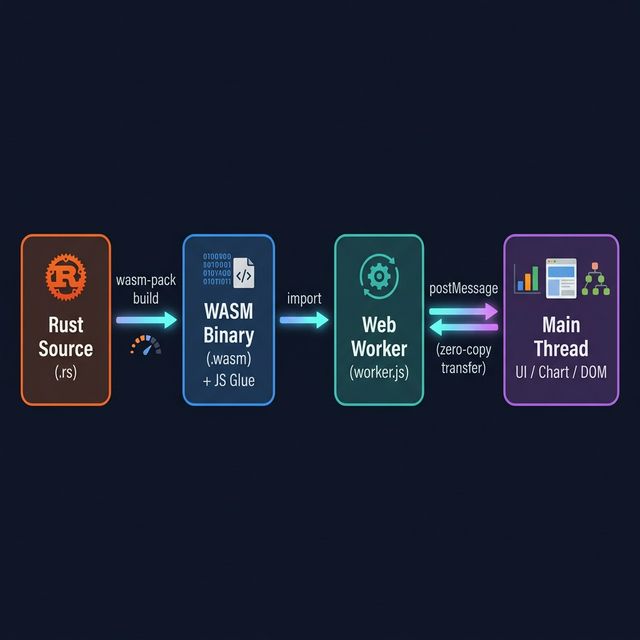
The problem we’ll solve: a web dashboard receives 5,000 sensor readings per second from a WebSocket connection and needs to apply an exponential moving average (EMA) and a peak-detector in real time, feeding results to a chart. In pure JavaScript this saturates the main thread and causes frame drops. In Rust + WASM it runs in a Web Worker, leaving the UI completely smooth.
Setting Up the Rust Toolchain
You need the wasm32-unknown-unknown compilation target and the wasm-pack build tool:
# Install target
rustup target add wasm32-unknown-unknown

# Install wasm-pack (compiles + generates JavaScript bindings)
cargo install wasm-pack
Create the crate:
cargo new --lib sensor_processor
cd sensor_processor
Edit Cargo.toml:
[package]
name = "sensor_processor"
version = "0.1.0"
edition = "2021"

[lib]
crate-type = ["cdylib"]  # Produces a C-compatible dynamic library WASM can consume

[dependencies]
wasm-bindgen = "0.2"

[profile.release]
opt-level = 3
lto = true          # Link-time optimisation — noticeably smaller, faster WASM output
Writing the Rust Processing Core
// src/lib.rs
use wasm_bindgen::prelude::*;

/// Exponential moving average processor.
/// Holds state between calls so the smoothed value persists across frames.
#[wasm_bindgen]
pub struct EmaProcessor {
    alpha: f64,       // Smoothing factor (0 < alpha < 1)
    ema: f64,         // Current EMA value
    peak: f64,        // Running peak
    peak_decay: f64,  // How quickly the peak indicator decays per tick
}

#[wasm_bindgen]
impl EmaProcessor {
    #[wasm_bindgen(constructor)]
    pub fn new(alpha: f64, peak_decay: f64) -> EmaProcessor {
        EmaProcessor {
            alpha,
            ema: 0.0,
            peak: 0.0,
            peak_decay,
        }
    }

    /// Process a batch of raw readings.
    /// Returns a flat Float64Array: [ema_0, peak_0, ema_1, peak_1, ...]
    pub fn process_batch(&mut self, readings: &[f64]) -> Vec<f64> {
        let mut output = Vec::with_capacity(readings.len() * 2);

        for &value in readings {
            // Update EMA
            self.ema = self.alpha * value + (1.0 - self.alpha) * self.ema;

            // Decay peak, then update if current EMA exceeds peak
            self.peak *= self.peak_decay;
            if self.ema > self.peak {
                self.peak = self.ema;
            }

            output.push(self.ema);
            output.push(self.peak);
        }

        output
    }

    /// Reset the processor state.
    pub fn reset(&mut self) {
        self.ema = 0.0;
        self.peak = 0.0;
    }

    /// Return the current EMA value without processing new data.
    pub fn current_ema(&self) -> f64 {
        self.ema
    }
}

/// Stateless batch function — useful for one-shot operations.
/// Takes a flat array of readings and returns the EMA series.
#[wasm_bindgen]
pub fn ema_series(readings: &[f64], alpha: f64) -> Vec<f64> {
    let mut ema = readings.first().copied().unwrap_or(0.0);
    readings.iter().map(|&x| {
        ema = alpha * x + (1.0 - alpha) * ema;
        ema
    }).collect()
}
The #[wasm_bindgen] attribute is the annotation that tells wasm-bindgen to generate the JavaScript glue for this type and its methods. Only types that implement Copy or can be serialised pass cleanly across the WASM boundary; complex Rust types stay on the Rust side.
Compiling to WebAssembly
# Build a release WASM module with JavaScript bindings
wasm-pack build --target web --release
This produces a pkg/ directory containing:
sensor_processor_bg.wasm— the binary WASM modulesensor_processor.js— JavaScript glue that loads the WASM and wraps the APIsensor_processor.d.ts— TypeScript types (useful even in plain JS projects)
The --target web flag generates ES module output, suitable for direct use with import in a modern browser or bundler (Vite, Webpack etc).
Wiring Into JavaScript
For real-time work, run the WASM module inside a Web Worker to keep the main thread free:
// worker.js — runs in a Web Worker
import init, { EmaProcessor } from '/pkg/sensor_processor.js';

let processor = null;

async function initialise() {
    await init();  // Load the .wasm binary
    processor = new EmaProcessor(0.2, 0.998);  // alpha=0.2, peak decay per tick
    console.log('[Worker] WASM module ready');
}

self.onmessage = async (event) => {
    if (!processor) await initialise();

    const { readings } = event.data;  // Float64Array from the main thread

    const startTime = performance.now();
    const result = processor.process_batch(readings);
    const elapsed = performance.now() - startTime;

    // Transfer the result buffer back without copying
    self.postMessage(
        { ema_peaks: result, processingMs: elapsed },
        [result.buffer]
    );
};
// main.js — in the browser main thread
const worker = new Worker('/worker.js', { type: 'module' });
worker.onmessage = ({ data }) => {
const { ema_peaks, processingMs } = data;
// ema_peaks is a Float64Array: [ema_0, peak_0, ema_1, peak_1, ...]
updateChart(ema_peaks);
console.log(`Processed in ${processingMs.toFixed(2)}ms`);
};
// Called by WebSocket message handler
function onSensorBatch(readings) {
// Transfer the buffer — zero-copy, no serialisation overhead
worker.postMessage({ readings }, [readings.buffer]);
}The key performance detail is the [result.buffer] and [readings.buffer] in postMessage. Without these, the browser serialises the typed array to a message, which involves a copy. With them, the underlying ArrayBuffer is transferred to the receiving context — zero-copy, zero serialisation overhead.
Benchmarking: Rust/WASM vs Pure JavaScript
Testing against a batch of 10,000 readings per call, measured with performance.now() across 100 iterations:
| Implementation | Mean time (ms) | P99 (ms) | Frame drops at 60fps |
|---|---|---|---|
| Pure JavaScript EMA | 14.2 | 22.8 | Frequent (>5ms budget) |
| Rust/WASM (main thread) | 1.8 | 2.4 | Rare |
| Rust/WASM (Web Worker) | 1.8 | 2.5 | None (off main thread) |

The WASM implementation is approximately 8× faster for this workload. The speed differential is largest for tight numerical loops — exactly the EMA inner loop in the Rust code above.
Passing Complex Data Across the WASM Boundary
The WASM memory model means you can only pass numbers and typed arrays cheaply across the boundary. For more complex structures, you have two options:
Option 1: JSON serialisation (convenient, slower for large payloads)
use wasm_bindgen::JsValue;
use serde::{Serialize, Deserialize};

#[wasm_bindgen]
pub fn process_json(data: JsValue) -> JsValue {
    let readings: Vec<f64> = serde_wasm_bindgen::from_value(data).unwrap();
    let result = /* processing */;
    serde_wasm_bindgen::to_value(&result).unwrap()
}
Option 2: Write to WASM memory directly (fast, more boilerplate)
// Allocate a slice in WASM memory and write directly to it
const { memory, alloc, dealloc } = wasmModule;
const ptr = alloc(readings.length * 8);  // f64 = 8 bytes
const view = new Float64Array(memory.buffer, ptr, readings.length);
view.set(readings);  // Direct memory write — no serialisation
const resultPtr = process_in_place(ptr, readings.length);
For most use cases — batches under ~100KB — JSON serialisation is fast enough and far simpler. Switch to direct memory access only when you have measured that serialisation is actually the bottleneck.
Integrating with a Vite Project
If you are using Vite, add the vite-plugin-wasm plugin to handle the .wasm binary:
npm install -D vite-plugin-wasm vite-plugin-top-level-await// vite.config.js
import { defineConfig } from 'vite';
import wasm from 'vite-plugin-wasm';
import topLevelAwait from 'vite-plugin-top-level-await';
export default defineConfig({
plugins: [wasm(), topLevelAwait()],
});Worker files need ?worker suffix on the import:
import SensorWorker from './worker.js?worker';
const worker = new SensorWorker();
When Rust/WASM Is the Right Choice
Rust + WASM is worth the added build complexity when:
- You have a tight numerical loop (signal processing, image convolution, spatial indexing, simulation)
- The loop runs frequently enough to cause measurable frame drops or lag
- You cannot move the computation to a server (latency requirements, offline support, cost)
It is not worth it for DOM manipulation, network requests, or anything that spends most of its time waiting — JavaScript is perfectly adequate there.