
OS³ (Open Source Security Studio) is a deliberately vulnerable, modular, and instructor‑friendly platform for teaching cyber security through direct, repeatable practice. It is purpose‑built for higher education, internal upskilling, and STEM outreach. For CMU540 (Computer Science) at Birmingham Newman University, OS³ provides a practical environment to link conceptual material to lived experience: learners don’t just read about vulnerabilities—they exploit them safely, then fix them in place.
You’ll find paired “insecure vs. secure” implementations of core topics (e.g., SQL injection, XSS, CSRF, SSRF, access control, crypto practices, logging/monitoring) and network security labs (protocol security, port scanning, DNS security, traffic analysis, firewall simulation). Each module is tightly scoped and runs locally, making it ideal for a 3 hour minute seminar, a flipped‑classroom activity, or a guided workshop with community groups.
OS³ is written in Python with Flask and uses a simple SQLite database to keep the stack approachable. The code is designed to be read and extended by students. Instructors can highlight exactly where a vulnerability lives in the code and how secure remediation differs, line‑by‑line.
Key scaffolding design choices:
- Paired demos: Every concept comes with an insecure route/page and a secure route/page, so learners see both sides.
- Minimal dependencies: Small, clear Python stack—easy to run on Windows (PowerShell), macOS, or Linux.
- Transparent pedagogy: Each route maps to a template, a blueprint, and a specific risk with intentionally readable code.
- Extensible modules: Add a new blueprint with a couple of files and it’s part of the app.
OS³ is free and open source. Code is MIT‑licensed; learning content is CC BY 4.0. Use it, adapt it, and please credit the project when you share.
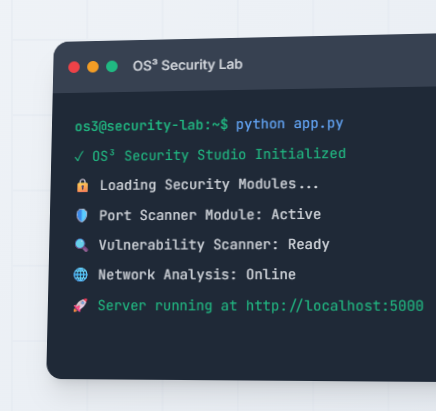
Getting Started on Windows (PowerShell)
Prerequisites:
- Python 3.8+ installed and on PATH
- 4 GB RAM, ~2 GB free disk space
- A modern web browser
Clone and run locally in Windows PowerShell:
# 1) Clone the repository
git clone https://github.com/jwilliamsresearch/os3-security-studio.git
cd os3-security-studio

# 2) Create and activate a virtual environment
python -m venv .venv
.\.venv\Scripts\Activate.ps1

# 3) Install dependencies
pip install -r requirements.txt

# 4) Launch the platform
python app.py

# 5) Open your browser and visit
# http://localhost:5000
You can also use run.bat if present in the repository root.
Default demo credentials (for quick trials and demos):
- Admin:
admin/admin123 - Student:
testuser/password - Demo:
john/weak
Note: These credentials are intentionally weak—only use them in this simulated environment.
How the Platform Is Organised
OS³ follows Flask’s application factory pattern. The main entry point is app.py, which calls create_app() from app/__init__.py. Blueprints register individual modules with clear URL prefixes; templates live under templates/ and static assets under static/.
At a glance:
- App entry point:
app.py - App factory and blueprint wiring:
app/__init__.py - SQLite setup and seed data:
app/models/database.py - Per‑topic routes:
app/routes/*.py - Utilities (auth, security headers):
app/utils/*.py - Templates:
templates/ - Static:
static/
The following sections walk module‑by‑module through what’s available and how to use it in class.
Core Web Security Modules
Each web module has two sides: an insecure implementation that exposes a vulnerability, and a secure one that demonstrates mitigation. You’ll find the code in app/routes/ and the paired templates under templates/<topic>/.
1) SQL Injection
- Routes:
app/routes/sql_injection.py - Templates:
templates/sql_injection/ - URL:
/sql-injection/→ Insecure:/insecure, Secure:/secure
Insecure implementation illustrates string concatenation in SQL queries:
# app/routes/sql_injection.py (insecure path)
sql = f"SELECT username, email, role FROM users WHERE username LIKE '%{query}%'"
cursor.execute(sql)
Secure implementation uses parameterised queries:
sql = "SELECT username, email, role FROM users WHERE username LIKE ?"
cursor.execute(sql, (f'%{query}%',))
Classroom use:
- Task students with crafting a payload that returns all users from the insecure path.
- Then ask them to explain exactly why the secure path is resistant.
- Extension: Add input validation and least‑privilege DB accounts to a checklist.
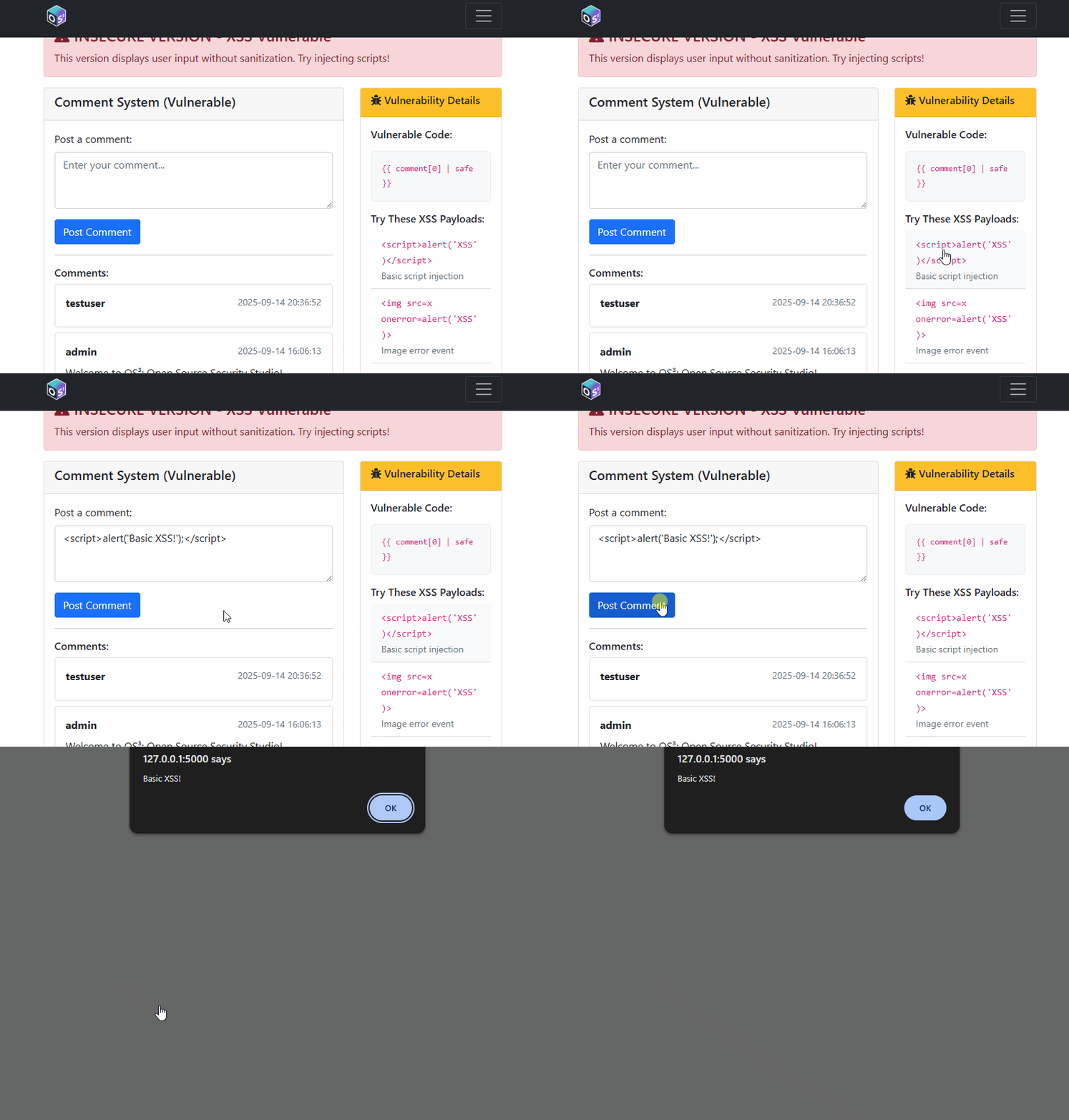
2) Cross‑Site Scripting (XSS)
- Routes:
app/routes/xss.py - Templates:
templates/xss/ - URL:
/xss/→ Insecure:/insecure, Secure:/secure
The insecure version stores comments verbatim; the secure path sanitises user input with bleach.clean and allows a minimal tag set:
comment = bleach.clean(comment, tags=['b', 'i', 'em', 'strong'], strip=True)Classroom use:
- Show reflected vs. stored XSS using the comment board.
- Ask students to propose a safe rich‑text policy and justify allowed tags/attributes.
3) Cross‑Site Request Forgery (CSRF)
- Routes:
app/routes/csrf.py - Utilities:
app/utils/auth.py - URL:
/csrf/→ Insecure:/insecure, Secure:/secure
The secure variant issues and validates a CSRF token for state‑changing operations (e.g., a mock “transfer”):
# Token management in app/utils/auth.py
def generate_csrf_token():
    if 'csrf_token' not in session:
        session['csrf_token'] = secrets.token_hex(16)
    return session['csrf_token']
4) Authentication and Password Policy
- Routes:
app/routes/auth.py - Templates:
templates/auth/andtemplates/login.html - URL:
/auth/→ Login:/login, Insecure register:/insecure-register, Secure register:/secure-register
The insecure registration barely validates inputs; the secure path enforces strong password requirements using regular expressions (uppercase/lowercase/number/special character, min length).
5) Access Control and IDOR
- Routes:
app/routes/access_control.py - Templates:
templates/access_control/ - URL:
/access-control/→ Insecure:/insecure/<user_id>, Secure:/secure/<user_id>
The insecure view returns any user by ID to any logged‑in user—an Insecure Direct Object Reference. The secure route checks session['user_id'] before serving data.
6) Sensitive Data Exposure
- Routes:
app/routes/data_exposure.py - Templates:
templates/data_exposure/ - URL:
/data-exposure/→ Insecure:/insecure, Secure:/secure
The insecure path returns password hashes alongside usernames and emails; the secure path returns only the minimal fields required for the UI.
7) File Upload Security
- Routes:
app/routes/file_upload.py - Templates:
templates/file_upload/ - URL:
/file-upload/→ Insecure:/insecure, Secure:/secure
The insecure path trusts filenames and accepts any extension; the secure variant uses werkzeug.utils.secure_filename and a small allowlist.
8) Server‑Side Request Forgery (SSRF)
- Routes:
app/routes/ssrf.py - Templates:
templates/ssrf/ - URL:
/ssrf/→ Insecure:/insecure, Secure:/secure
The insecure fetcher requests any URL. The secure fetcher validates scheme, blocks localhost/private ranges, and whitelists domains.
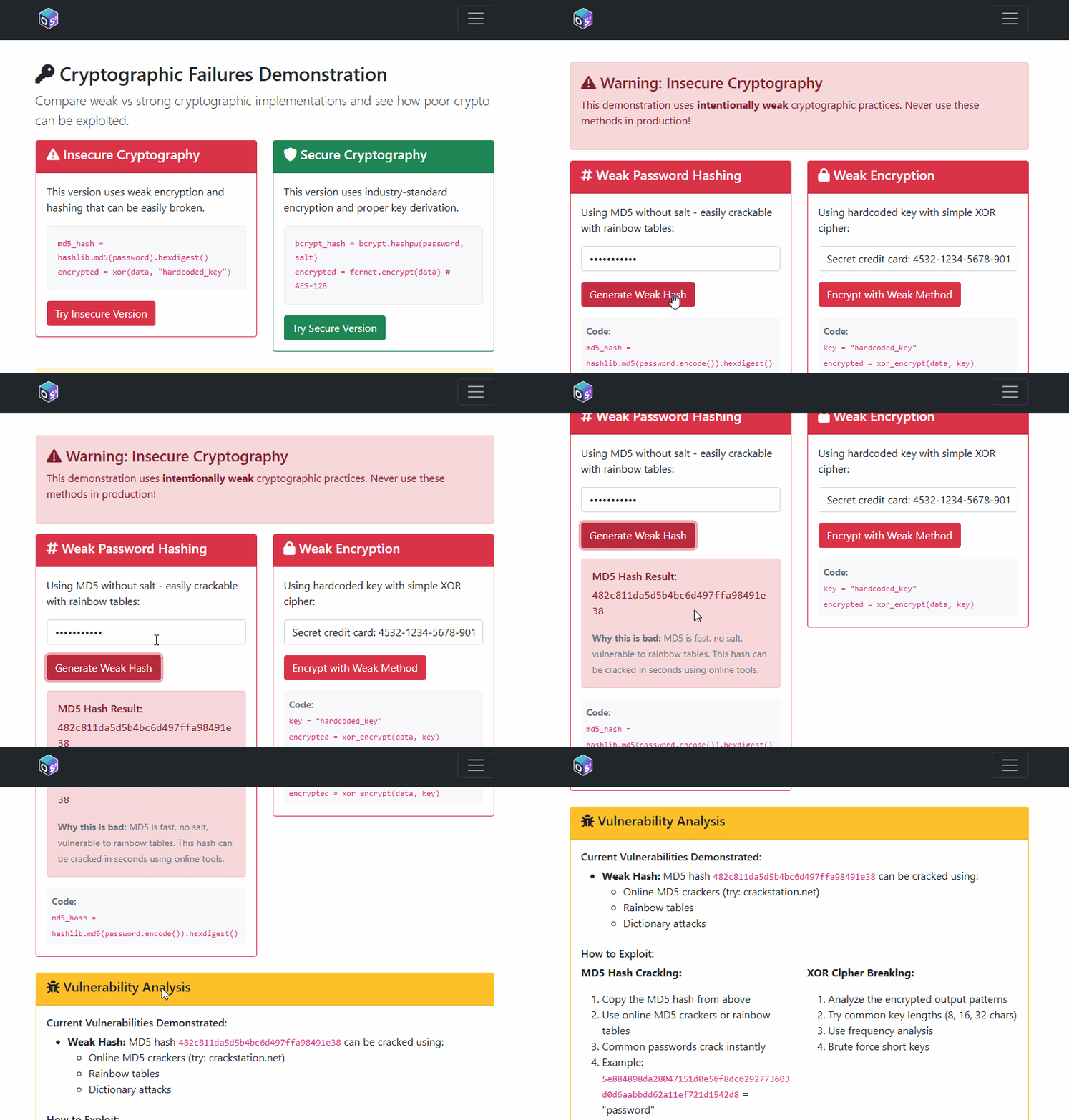
9) Cryptography: Weak vs. Strong Practices
- Routes:
app/routes/crypto.py - Templates:
templates/crypto/ - URL:
/crypto/→ Insecure and secure APIs
The insecure routes demonstrate MD5/SHA1 hashing and XOR “encryption” with a hardcoded key (all bad ideas). The secure routes demonstrate bcrypt and PBKDF2 for hashing and Fernet (AES‑128‑CBC + HMAC) for authenticated encryption.
10) Security Headers and Browser Defences
- Utility:
app/utils/security_headers.py
Every response receives a modern baseline of security headers (CSP, HSTS, Referrer‑Policy, X‑Content‑Type‑Options, X‑Frame‑Options).
11) Security Logging and Monitoring
- Routes:
app/routes/logging_monitoring.py - Templates:
templates/logging_monitoring/ - URL:
/logging_monitoring/→ Insecure and secure logging demos
Demonstrates the difference between poor logging (only generic errors) and security‑aware logging with relevant context.
Network Security Modules
These modules simulate common blue‑team and red‑team activities without touching your real network. Everything is deterministic and viewable in the browser.
12) Protocol Security: HTTP vs. HTTPS and MITM
Learners submit credentials via an “HTTP” form (insecure path), then view a simulated “intercepted” payload and headers. The secure path shows base64‑encoded payload and a simulated TLS session.
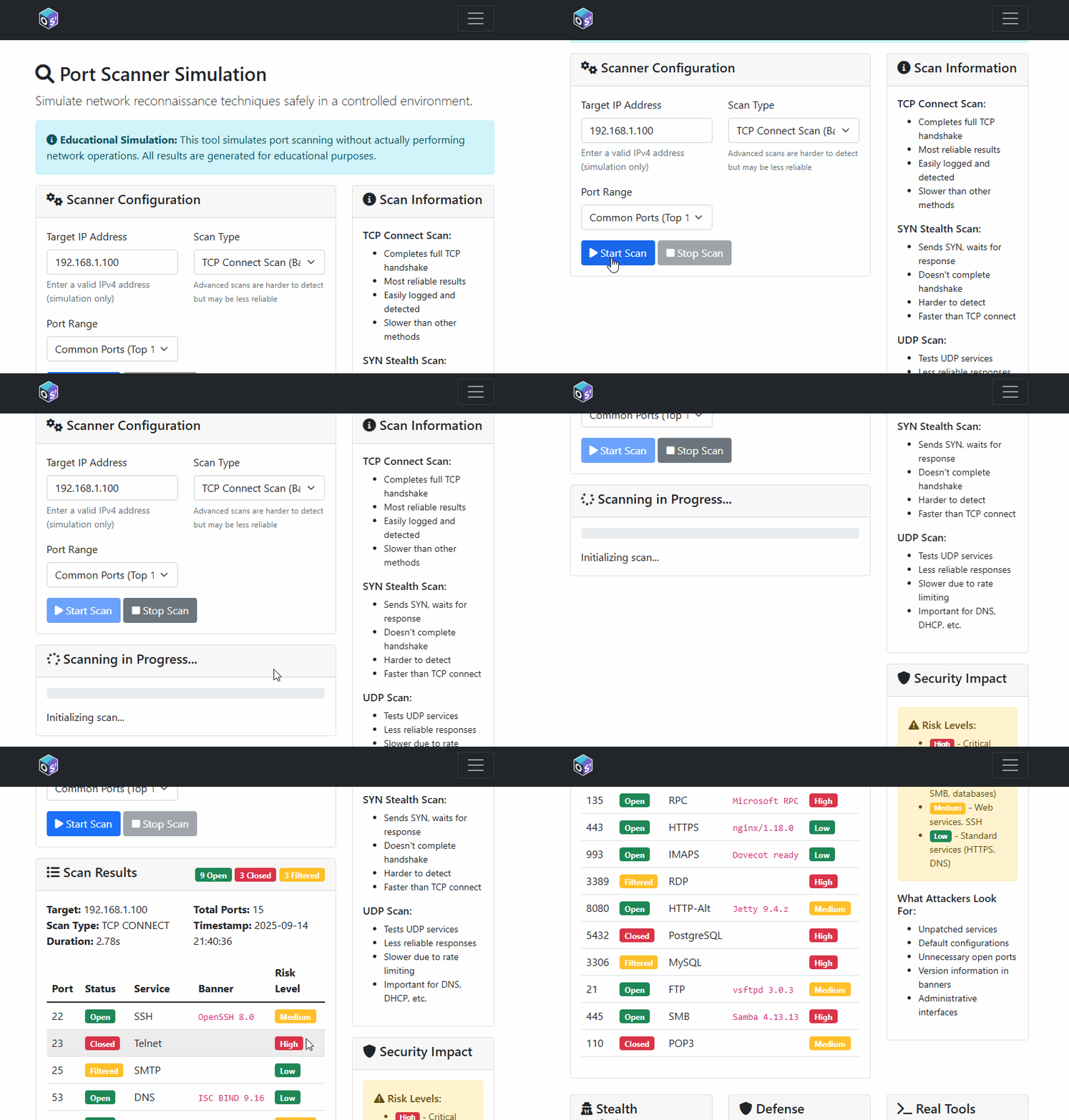
13) Port Scanner Simulation + Defences
Simulates TCP connect, SYN/FIN/NULL/XMAS stealth scans, and UDP quirks; returns banners and statuses from a curated set of common ports.
14) DNS Security: Lookup, Poisoning, Tunnelling, Secure DNS
Learners perform mock lookups, poison a simulated cache, observe consequences, and try DNS tunnelling for “data exfiltration”.
15) Traffic Analysis and Network Forensics
Creates realistic packet logs (normal and suspicious), exposes live traffic via API for dashboards, and includes guided forensics scenarios.
16) Firewall Rule Simulation
An interactive firewall rule set with allow/deny/log actions, priorities, and testing.
Teaching Notes and Pedagogy
- Constructive alignment: Each lab links a learning outcome to a concrete artefact (exploit, fix, explanation).
- Cognitive apprenticeship: Instructors “think aloud” by stepping through the code during demos.
- Secure by default: The global security headers middleware enables a conversation on platform‑level controls.
- Ethics first: Every lab should restate the rules—do not attack systems you don’t own.
Licensing and Attribution
- Code: MIT License
- Educational content: CC BY 4.0
Please attribute “OS³: Open Source Security Studio” and Dr. James Williams when you adapt or share materials.
Final Thoughts
Security education thrives on visibility. OS³ lets learners see, touch, and reason about vulnerabilities with code right in front of them. For CMU540, these modules can anchor weekly labs, revision sessions, and assessed practicals. For outreach, the same modules become interactive stories about how modern systems can fail and how we build them back safer and stronger.
If this studio helps your teaching or training, consider giving the repository a star and sharing your feedback.
Stay curious, stay ethical—and enjoy building secure systems.